
Microsoft Excel - Functions & Formulas : Dynamic Array
Software Version: M365 to Excel 2021
Course Code: CMS-EXFF-DA
Course Certification: NA
Duration: 1 Day
Overview
Microsoft Excel Dynamic Arrays represent a significant advancement in Excel’s formula capabilities, fundamentally changing how users interact with and process data. The new spilling feature enables more complex calculations while simplifying workflows. Users can now perform calculations using multiple values (arrays) and have the results (array) spilled into adjacent cells. This eliminates the need for copy-paste or manual refreshes (as with PivotTable or Power Query).
Some new Excel functions allow complex calculations with “row context,” similar to DAX functions in Power Pivot. In other words, they enable previously impossible calculations while increasing efficiency.
If you are building dashboards, automating reports, or simply want cleaner formulas, dynamic arrays are essential.
Beyond traditional dynamic array functions, this course now integrates Copilot in Excel wherever applicable, enabling participants to generate formulas conversationally, clean data faster, and build reports with AI assistance. Copilot reduces manual effort, improves accuracy, and empowers analysts to focus on insights rather than mechanics.
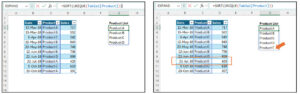
In an example below, the Excel formula spilled the product list without duplication into the cells below. The Excel formula is automatically updated when the ‘Product’ in the table changes.
Course Objectives
At the end of the course, participants will be able to use functions to:
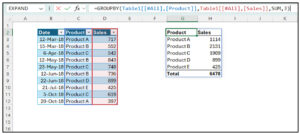
:: Create PivotTable-like report.
Example: Summarise sales by product:
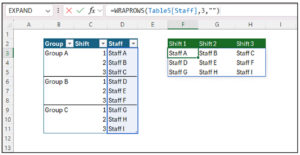
:: Transform data structure.
Example: Rearrange staff schedules by shift:
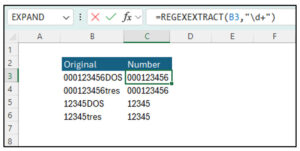
:: Clean up data.
Example: Extract number from text:
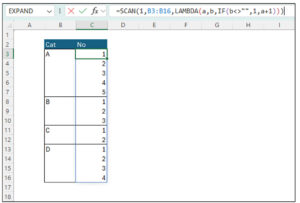
:: Perform calculations on array with “row context”.
Example: Generate index numbers starting from 1 for each category
:: Use Copilot to generate formulas, summarise datasets, and automate reporting workflows conversationally. (wherever applicable)
Audience
This course is intended for participants who are experienced with functions and formulas in Excel 2019 and prior, and who wish to learn more about dynamic array, with the objectives of transforming, analysing and presenting data.
Prerequisites
- Basic knowledge of the Microsoft Windows operating system and its core functionality.
- Some knowledge of Excel functions and formulas.
Please get in touch with us for the latest/updated course modules/lessons.